Tired of information overload?
KRYBL filters the essentials for you. A personalized newsletter, once a week.
You open your phone in the morning. 47 notifications. 12 unread newsletters. An endless Twitter feed. Result: 30 minutes later, you haven't retained anything useful.
According to a study from the University of California, we're exposed to the equivalent of 174 newspapers per day in information volume. Yet our brains can only consciously process about 120 bits per second. The problem isn't a lack of information. It's the absence of a routine to consume it intelligently.
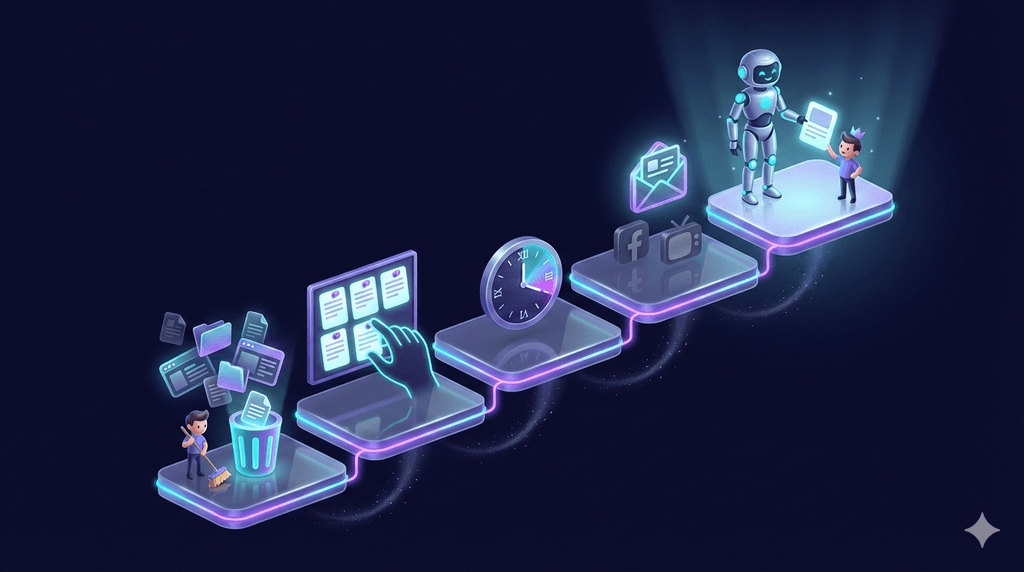
Good news: it only takes 5 steps to turn your information consumption into a real advantage. Here's how.
Step 1: Audit Your Current Sources
Before you build, you need to clean up. Take 15 minutes to list all your current information sources:
- Newsletters you're subscribed to
- Accounts you follow on social media
- News apps installed on your phone
- Podcasts in your queue
- YouTube channels, RSS feeds, Google alerts...
Now, for each source, ask yourself two questions:
- Did I check it this week? If not, it's probably noise.
- Did it concretely help me? If you can't remember the last useful article, that's a sign.
The 3-Category Test
Sort each source into one of these categories:
- Essential: information directly tied to your professional or personal goals
- Nice-to-have: you enjoy reading it, but it's not critical
- Parasite: you scroll out of habit, with no real value
Delete the parasites. Limit nice-to-haves to 2-3 sources. Keep the essentials. If you're not sure where to start, read our article on why generic newsletters no longer serve you.
80% of the value comes from 20% of your sources. The rest is wasting your time.
Step 2: Define Your Priority Topics (Max 4-6)
Now that you've cleaned house, it's time to give your monitoring some direction. The classic mistake: wanting to "stay informed about everything." It's impossible and counterproductive.
Choose 4 to 6 topics maximum that match:
- Your main activity (your job, your industry)
- Your current projects (a course, a side project, an investment)
- Your deep interests (not trending topics)
A Concrete Example
If you're a freelance developer with a passion for personal finance:
- Web development (new frameworks, best practices)
- Freelancing & entrepreneurship
- AI and productivity
- Personal finance & investing
Four clear topics. Anything that doesn't fit these categories can wait.
Write your topics somewhere visible (a sticky note, a note on your desk). They serve as a filter: when new information arrives, if it doesn't match any topic, let it go.
Step 3: Pick a Fixed Time in Your Day
The number one trap with information consumption is continuous mode, a direct driver of decision fatigue. Checking sources a bit in the morning, a bit between meetings, a bit on the commute, a bit in the evening. In the end, you spend 1.5 hours a day without even realizing it.
The solution: a fixed time slot, like an appointment with yourself.
When Should You Choose?
- Morning (7-9 AM): ideal if you want to start the day informed. Be careful not to exceed 20 minutes.
- Lunch break: a good compromise between productivity and disconnection.
- Sunday morning: perfect for a weekly roundup, with no pressure.
The 20-Minute Rule
Set a timer. 20 minutes maximum to go through your essential sources. When the timer rings, you stop. Even if you haven't read everything.
Why? Because truly important information will always find you. What you "miss" probably wasn't that crucial.
Step 4: Choose the Right Format (Newsletter > Social Media > TV)
Not all information formats are created equal. Here's a ranking based on the value-to-time ratio:
| Format | Value | Time Required | Noise |
|---|---|---|---|
| Targeted newsletter | High | 10-15 min | Low |
| Specialized podcast | High | 20-40 min | Low |
| In-depth article | High | 5-10 min | Medium |
| Filtered RSS feed | Medium | Variable | Medium |
| Social media | Variable | Unlimited | High |
| TV / news channels | Low | 30-60 min | Very high |
The newsletter is the best format for an effective routine. Why?
- It arrives at a specific time (no temptation to scroll)
- It's pre-filtered by someone (or an algorithm) you trust
- It takes a defined amount of time to read
- It doesn't create an addictive loop (unlike infinite scroll)
Social media isn't useless, but it requires iron discipline to stay focused. Save it for specific uses (professional networking, niche communities). For a detailed format comparison, check out our guide to curation tools: RSS, AI and aggregators.
Step 5: Automate With an Intelligent Tool
You have your topics, your time slot, your format. One last problem remains: even with a good routine, manually searching for relevant information takes time.
That's where an intelligent curation tool changes everything. Instead of browsing 10 sources yourself, you receive a pre-filtered summary centered on your topics.
KRYBL does exactly that: you choose your topics of interest, and once a week you receive a personalized newsletter that has filtered thousands of sources to keep only the signal. No noise, no ads, no clickbait. Just the information that matters to you, delivered when you choose.
Automation gives you a decisive advantage: you go from "searching for information" to "receiving information." Your only job becomes reading and acting.
Bonus: Information Routine Template
Here's a ready-to-copy template to set up your routine today:
My Information Routine
My 4 priority topics:
My info time slot: _______ (day/time)
Max duration: 20 minutes
My sources (max 3-4):
- ____________________
- ____________________
- ____________________
- ____________________
My curation tool: ____________________
My rules:
- No news notifications on my phone
- No info before _______ / after _______
- Unsubscribe from _______ parasite sources by Friday
- Review my routine in 2 weeks
Quick-Start Checklist
- Audit my current sources (15 min)
- Define my 4-6 topics (10 min)
- Block a time slot in my calendar (2 min)
- Subscribe to 1-2 quality newsletters (5 min)
- Turn off news notifications (2 min)
- Delete 3 parasite apps or sources (5 min)
Total setup time: ~40 minutes for months of peace of mind.
Conclusion
An information routine isn't a productivity luxury. It's a necessity in a world that produces more content in a single day than you could read in a lifetime.
In 5 steps, you take back control: you sort, you focus, you choose your moment, you prioritize the right formats, and you automate the rest.
The result? Less time wasted, less stress, and information that actually serves you.
Ready to put this into practice? KRYBL delivers a tailor-made newsletter every week, to read or listen to, in 10 minutes. Try free for 15 days.
Ready to take back control?
Join thousands of readers who chose clarity. A personalized newsletter, to read or listen to, once a week.
Get started with KRYBLRelated articles
5 Tools to Automate Your News Monitoring Effortlessly in 2026
Discover the best tools to automate your news monitoring in 2026: Google Alerts, Feedly, Inoreader, Flipboard and KRYBL compared in detail.
Decision Fatigue: When Too Much Information Kills Good Decisions
Discover why you make poor decisions at the end of the day and how information overload makes it worse. Practical strategies to regain your mental clarity.